TABLE OF CONTENTS
Overview
A subject matter expert (SME) is someone with knowledge of a topic that pertains to their organization. In Stack Internal, SMEs can help review AI-generated answers and other knowledge when a human check is needed.
This article explains what it means to be an SME, how Stack Internal requests a content review, and what to do when you receive a request.
About trust
Trust is how Stack Internal helps people understand how reliable a piece of knowledge may be. It uses signals from content, contributors, and expert review to generate a trust score. Stack Internal users can request an SME review for the response they receive.
Even a high automated trust score does not replace human judgment–user input is still needed in many cases. When SMEs review requests, they use their knowledge of the topic and the context provided. This results in one of the strongest signals Stack Internal can use to improve trust in knowledge.
The SME role in the trust loop
An SME adds a human check when Stack Internal needs more confidence in an answer. Your review helps confirm the information is accurate, current, and useful before others rely on it.
When Stack Internal uses content that's been verified by an SME, it displays a "Validated by an expert" badge in the chat response.
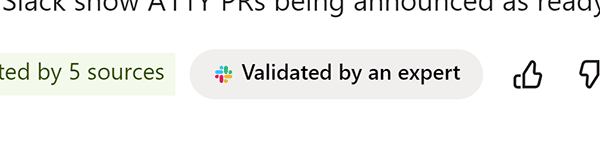
When users see that badge, they can be more confident that the information returned by Stack Internal is accurate and current.
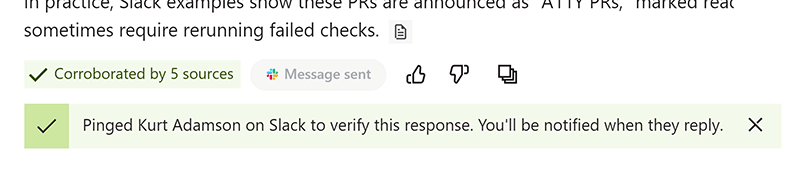
Users initiate the SME verification process through the web chat interface, MCP, or API. In the chat, users may see a Verify with SME button if the response Stack Internal provided wasn't already verified by an SME. When they click the button, Stack Internal sends a message to the SME. The user then sees confirmation that Stack Internal sent the message.
How a user becomes an SME
Stack Internal will automatically identify SMEs, assigning them based on their knowledge of a topic and site activity (for example: answering questions on a Stack Internal Community site). Workspace administrators then review and manage those assignments.
Over time, as you contribute to your organization's knowledge base, Stack Internal may identify you as an SME in a topic that you've contributed to. If you think an SME assignment is incorrect or no longer fits your role, contact your workspace administrator. You can also reach out to your site admin if you'd like to be considered as an SME for a given topic.
You as an SME
If you're assigned as an SME, you may receive notifications in a connected workspace tool, such as Slack. You'll then be able to confirm that the suggested answer is correct. When you review content as an SME, Stack Internal records the outcome as a trust signal. Your expertise and knowledge then help people find more reliable answers over time.
Get help
If you have questions or issues, reach out to our support team for help.